Claude Design for Non-Designer Founders: From Idea to Pitch Deck in One Day
Claude Design turns your DESIGN.md into an investor-ready pitch deck in hours — no Figma, no $2K freelancer. The exact founder workflow, step by step.

See Claude set up for your job
Skip the theory — pick your profession and get the real workflows, ready-to-use prompts, and exact setup for your work.
TL;DR. Claude Design turns your DESIGN.md into an investor-ready pitch deck in hours — no Figma, no $2K freelancer. The exact founder workflow, step by step. Practical walkthrough with prompt structure and the free tool.
You've spent three days trying to make Figma do what you see in your head, or you've paid a freelancer $2,000 for slides that still don't feel like your company. Claude Design launched on April 17, 2026, and the workflow for solo founders has changed enough that the old approach is no longer the default-sensible choice. Here's what to actually do.
What Claude Design Actually Does
Claude Design launched on Opus 4.7's vision capabilities and now lets you pick from Anthropic's latest models — the picker offers Fable 5.1 (and Fable 5) for the hardest briefs, Opus 5 for complex work (the default in our testing), Sonnet 5 for everyday tasks, and Haiku 4.5 for quick iterations, plus an effort control. It generates design artifacts — pitch decks, landing page wireframes, product mockups, UI prototypes — from plain-language prompts and uploaded brand assets. You describe what you want, feed it a brand file or palette, and it returns an editable visual output.
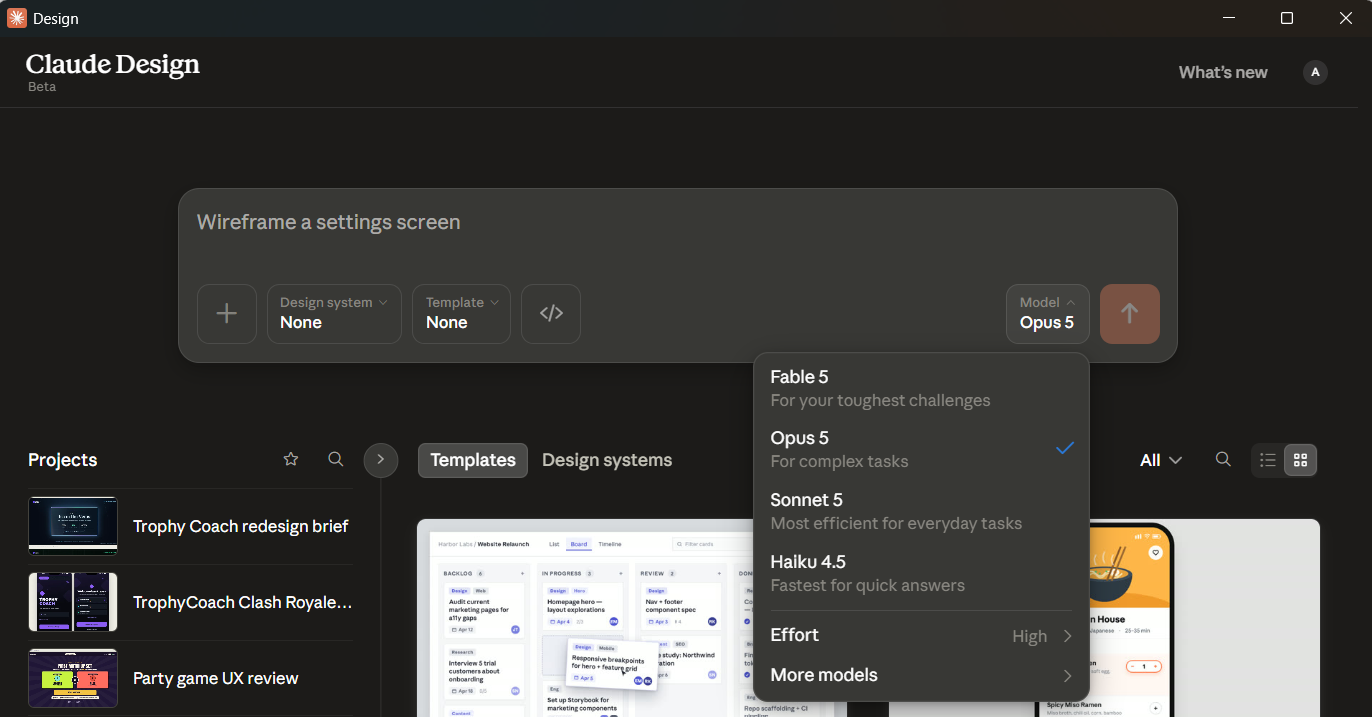
(Screenshot from July 2026; the picker now also lists Fable 5.1.)
The feature set that matters for founders specifically:
- Design system ingestion: Upload a DESIGN.md, a logo, or a Figma token file. Claude Design reads the intent, not just the hex values.
- Export formats: PPTX, PDF, and Canva-compatible output. Claude Code handoff for teams that want to move from mockup to production component.
- HyperFrames integration: Native motion graphics support launched April 26, 2026 — useful for animated demo slides and product walkthroughs.
- Access tier: Pro, Max, Team, and Enterprise plans only. Not available on the free tier.
It is not a Figma replacement. The output is a strong, investor-presentable first pass — not a production design system.
Step 1: Capture Your Brand in a One-Page DESIGN.md
Before you open Claude Design, write a DESIGN.md. This single file is how you prevent the brand drift that ruins consistency across a long deck. Claude Design reads it on every generation call instead of you re-specifying fonts and colors in natural language per slide.
A minimal DESIGN.md for a founder pitch context looks like this:
# DESIGN.md — [Your Company Name]

## Brand Essence
[One sentence: what feeling should the product evoke?]
Example: "Trustworthy data infrastructure for teams that can't afford surprises."

## Color Palette
- Primary: #1A1A2E (deep navy — authority, focus)
- Accent: #E94560 (coral red — urgency, conversion moments)
- Surface: #F7F7F9 (warm off-white — breathing room)
- Text: #0D0D0D (near-black — readability first)

## Type Scale
- Display: Inter Bold, 40px / line-height 1.1
- Heading: Inter SemiBold, 28px / line-height 1.3
- Body: Inter Regular, 16px / line-height 1.6
- Caption: Inter Regular, 13px / line-height 1.5

## Voice
- Direct, not casual. Confident, not arrogant.
- No jargon the investor hasn't heard from three other decks this week.
- Data before narrative. Numbers before adjectives.

## Do Not
- Use gradients on text
- Use more than 2 typefaces
- Use red for anything except the accent call-to-actionThe DESIGN.md Library at theaicareerlab.com/design-md has starter templates across seven industry verticals — SaaS, consumer, marketplace, fintech, health tech, deep tech, and services — so you're not starting from scratch.
Step 2: Draft the Deck Narrative Before Opening Claude Design
This is the step most founders skip, and it's why their first pass comes back with beautiful slides that say nothing. Claude Design is a visual renderer, not a storytelling engine. Feed it structure.
Write your 10 slide titles in plain text before you open the tool. A standard investor pitch arc:
- Problem — the specific pain, quantified
- Solution — one sentence, no adjectives
- Why Now — the market timing signal
- Product — what it actually does, shown not told
- Traction — numbers, even early ones
- Market Size — TAM/SAM/SOM, with your logic
- Business Model — how money flows
- Competition — the honest 2x2, not the rigged one
- Team — why you specifically
- Ask — what you need, what it buys
Write one sentence of body copy for each slide before generating anything. Claude Design will use those sentences as content scaffolding. Without them, it fills slides with placeholder copy that you'll spend more time deleting than writing.
Step 3: Generate Your First Pass with Claude Design
Open Claude Design. Upload your DESIGN.md. Then use this prompt template, filled in with your specifics:
You are building a 10-slide investor pitch deck for [Company Name].

Brand: [attached DESIGN.md]
Format: PPTX, 16:9, investor presentation
Audience: Seed-stage VCs in [sector]

Slide structure and content:
1. Problem: [your one sentence]
2. Solution: [your one sentence]
3. Why Now: [your one sentence]
4. Product: [your one sentence]
5. Traction: [your one sentence]
6. Market Size: [your one sentence]
7. Business Model: [your one sentence]
8. Competition: [your one sentence]
9. Team: [your one sentence]
10. Ask: [your one sentence]

Design direction: Clean, data-forward. Each slide should lead with the data point or claim,
not the label. Use generous whitespace. Limit to 3 visual elements per slide.
Callout boxes for key numbers only. No clip art, no stock photo placeholders.The first pass will be 70-80% of what you need. Do not regenerate the whole deck from this point — that's where token costs compound and you lose the progress.
Step 4: Iterate Without Burning Tokens
This is the highest-friction part of working with Claude Design, based on what founders have reported across Reddit threads covering the tool. Three tactics that reduce wasted generation cycles:
Screenshot and edit in Claude Code instead of regenerating. Take a screenshot of the slide you want to change. Open Claude Code alongside Claude Design. Ask Claude Code to rewrite just the layout logic for that slide based on the screenshot. Apply the suggested change as a targeted edit. This avoids triggering a full deck re-render for a single slide fix.
Use inline comments, not full rewrites. In your next prompt, reference specific slides by number: "Slide 4 — the product screenshot feels disconnected from the headline. Pull the headline down into the visual rather than floating it above." Do not say "redo slide 4." The first phrasing triggers a targeted revision; the second triggers a full slide replacement that may drift from your design system.
Lock the design system before iterating on content. If you're happy with the look on slides 1 and 2, tell Claude Design explicitly: "The visual treatment on slides 1 and 2 is correct. Apply the same spacing, font treatment, and color usage to all remaining slides. Do not change the established visual pattern." This single instruction prevents the style drift that makes decks look like they were assembled by committee.
For a broader look at AI tools in founder workflows, the 30-Day Reskilling Playbook Generator is built for exactly this kind of iterative skill-building — useful if Claude Design is your entry point into a larger AI workflow overhaul.
Step 5: Export and Polish
PPTX is the right format for any deck you expect to edit again or send to a co-founder. Fonts embed cleanly, animations survive, and you can make last-minute changes in PowerPoint or Google Slides without re-exporting from Claude Design.
PDF is the right format for the send-to-investor version. Fixed layout, no font substitution risk, no accidental slide reordering. Export as PDF only after the PPTX is finalized.
Canva export is useful if you want to collaborate with a non-technical designer or brand person after the first pass. The Canva output preserves the design system structure and is easier for a designer to rework than raw PPTX.
Common export problems to watch for: embedded images sometimes compress on PDF export, losing the sharpness you need on the traction chart slide. Export that slide separately at full resolution and replace it in the PDF manually if the compression is visible.
A Real Example Walkthrough
You're pitching ScreenPipe — a candidate screening tool for hiring managers that cuts first-round interview time by 60% using async video and AI scoring.
DESIGN.md excerpt:
# DESIGN.md — ScreenPipe

## Brand Essence
"Hiring decisions you can defend, made in half the time."

## Color Palette
- Primary: #0F172A (slate — serious, enterprise)
- Accent: #22D3EE (cyan — speed, technology)
- Surface: #F8FAFC
- Text: #1E293B

## Voice
- Data before narrative. HR directors are skeptical of AI promises.
- Specific percentages over vague claims ("60% faster" not "much faster").
- No "revolutionary." No "AI-powered" in headlines.Deck narrative (10 slide titles + one-liners):
- Problem: "First-round interviews take 4.2 hours per hire — most of that time is scheduling, not evaluation."
- Solution: "ScreenPipe replaces the scheduling-and-screening phase with a 12-minute async video scored against your rubric."
- Why Now: "The 2026 wave of mid-size company hiring freezes is ending; teams are restarting with 30% smaller HR headcounts."
- Product: "Candidates submit a 3-question video. ScreenPipe scores against your rubric and ranks the top 5 within 2 hours."
- Traction: "14 enterprise pilots, 8 converted to paid, NPS 67 among hiring managers."
- Market Size: "$4.2B TAM in recruiting software; SAM of $800M in mid-market async tools."
- Business Model: "$299/seat/month, usage-based overage above 50 screens/month."
- Competition: "HireVue serves enterprise; Loom is unstructured; ScreenPipe owns structured mid-market async."
- Team: "Two PMs from LinkedIn Talent Solutions; one engineer from Greenhouse."
- Ask: "$2M seed; 18-month runway to Series A metrics: 50 paying accounts, $180K MRR."
What comes out of Claude Design: A clean 16:9 PPTX in slate and cyan. The problem slide leads with "4.2 hours" in 80px display type, supported by a single horizontal timeline showing where the time goes. The traction slide centers the 8/14 conversion fraction in a large callout box with the NPS score below it. The competition slide renders the 2x2 with proper axis labels (not the blank grid Claude sometimes defaults to). The team slide uses initials-based avatar placeholders since founder photos aren't fed in.
Total first-pass generation: roughly 4-6 minutes on a Pro plan with a well-structured prompt.
Where Claude Design Falls Short for Founders
Be honest about this before you commit to the workflow.
Data visualizations are frequently wrong. If your traction slide includes a multi-series chart — revenue over time, cohort retention curves, conversion funnel — Claude Design will render a chart, but the values often don't match what you specified. Treat any generated chart as a placeholder. Export the PPTX and replace it with a chart built in Excel, Sheets, or Flourish before sending to investors.
Brand consistency drifts across long decks. A 10-slide deck stays coherent. A 25-slide board update or a 40-slide technical due diligence deck will develop inconsistencies in spacing, type size, and color usage by slide 20. The DESIGN.md helps, but doesn't fully prevent this. For anything above 15 slides, do a manual consistency pass before export.
No accessibility audit. Claude Design does not check color contrast ratios or screen-reader compatibility. If you're presenting to a large corporate audience with accessibility requirements, run the exported PPTX through an accessibility checker manually.
Founder photos and real product screenshots require manual insertion. Claude Design generates placeholder layouts, not real imagery. Budget 20-30 minutes post-generation to swap in actual screenshots, headshots, and logos.
When to bring in a designer instead: If your product's visual design is the differentiator — you're pitching a consumer app where the UI is the product — hire a designer for the product screenshots and UI mockup slides. Claude Design handles the deck structure; a human designer handles the moments where the aesthetic is load-bearing.
Cost Reality of Claude Design
Token costs are approximate and change with plan tiers and iteration depth. Based on reported usage in Reddit threads since the April 17 launch:
A clean 10-slide first pass on a Pro plan ($20/month) costs somewhere in the range of 10-20% of your monthly token allowance, depending on asset complexity. One full deck generation plus three rounds of targeted slide revisions is typically within budget without hitting limits.
On Max plan ($100/month), the higher token ceiling means you can run two or three full deck variants — useful if you're testing different narrative arcs before deciding on a structure. Most founders doing serious pitch iteration operate on Max.
Team and Enterprise plans bill per token at volume rates. For a team doing weekly investor updates plus a fundraising deck, the per-token economics are better than generating on individual Pro accounts.
The practical advice from Reddit founders: generate the first pass on Pro, evaluate whether the tool fits your workflow, then upgrade to Max if you're actively fundraising. Do not run more than two full deck regenerations per sitting — targeted slide edits are 5-10x more efficient than full re-renders.
What to Do Next
-
Get your brand foundation right first. The DESIGN.md Library at theaicareerlab.com/design-md has starter templates for seven founder verticals so you're not guessing at hex values and type scales when you write your first prompt.
-
If you're a designer thinking about what this means for your career, the Designers After AI hub covers which design skills have strengthened in value and which are being absorbed into AI tooling — useful context before you restructure your service offering or portfolio.
-
If you want a structured audit of your full founder AI workflow — not just the deck, but your research, writing, and product documentation process — run the AI Readiness Audit. It takes six minutes and returns a workflow score with specific tool recommendations by bottleneck.
Claude Design is in research preview as of April 26, 2026. The workflow above will evolve as Anthropic ships updates. For what's shipping now: Anthropic's Claude Design announcement and TechCrunch's launch coverage. The awesome-claude-design repo on GitHub is tracking community-built prompts and workflows as they emerge.
See Claude set up for your job
Skip the theory — pick your profession and get the real workflows, ready-to-use prompts, and exact setup for your work.
Set up AI for your job — free, in about 2 minutes
Pick your profession and get your first working AI tool, a step-by-step guide, and a $0 plugin to take home. No credit card.
Get my free setupSee Claude set up for your job
Real workflows and ready-to-use prompts, profession by profession.
Frequently asked questions
What is Claude Design and how does it work for founders?+
Claude Design is Anthropic's design-generation surface that turns a DESIGN.md spec plus natural-language prompts into functional UI (HTML/CSS/components). For founders, this means generating a landing page, pitch deck, founder website, or initial product UI in minutes instead of weeks — provided you can articulate your design system. The bottleneck is the DESIGN.md, not the rendering.
Do I need a designer to use Claude Design effectively?+
No, but you do need to either (a) author a clear DESIGN.md yourself, or (b) start from a pre-built DESIGN.md library purpose-built for your use case. The [Career-Focused DESIGN.md Library](/design-md) has six copy-paste files (resume site, freelancer landing, founder pitch deck, coaching site, portfolio, career-transition portfolio) designed exactly for founder/career artifacts.
Is Claude Design's output production-ready?+
For landing pages, founder sites, pitch decks, and early-product UI scaffolding — generally yes, with light polish. For complex production apps with sophisticated interaction patterns and accessibility audits, treat the output as a fast first draft. Most founders ship the Claude Design output as v1 and iterate from there.
What's a DESIGN.md and why does it matter?+
A DESIGN.md is a single markdown file that specifies your design system in machine-readable form: palette, typography, spacing, components, motion, voice, and explicit anti-patterns. Claude Design (and similar tools) consumes the DESIGN.md to enforce consistency across generated UI. The clearer the DESIGN.md, the more cohesive the output.
How does Claude Design compare to v0, Lovable, Figma Make, or Galileo?+
All target similar workflows (prompt-to-UI) but differ in stack and emphasis. v0 (Vercel) excels at React + Tailwind component generation. Lovable focuses on full-app scaffolding. Figma Make integrates into the Figma design environment. Galileo emphasizes high-fidelity static design. Claude Design's strength is the DESIGN.md spec layer — explicit design-system articulation that drives consistent output, especially well-suited to founders who want repeatable brand application across multiple artifacts.
What's the fastest way for a founder to get started with Claude Design?+
(1) Pick a starting DESIGN.md from the [library](/design-md) closest to your use case (founder pitch deck, resume site, etc.); (2) Customize the palette, typography, and voice to match your brand; (3) Prompt Claude Design with a one-paragraph description of the artifact you want; (4) Iterate by adjusting the DESIGN.md and re-generating. Most founders ship a v1 in 1-2 hours from start.
Related Guides
Why Gemini Flash Starts Coding When You Just Asked Something
Gemini Flash treats a question as a task and starts writing code or files. Why it happens, the one-line instruction that stops it, and when to let it run.
How to Review an AI Draft Before You Send It
The two biggest tech threads of the month were both complaints about unedited AI output. Here's the review pass that stops your work reading like everyone else's: what to verify, what to cut, and how to put your voice back — in about six minutes.
Why Your AI Writing Sounds AI-Written — and How to Fix It
Recruiters flag it, clients feel it, colleagues quietly discount it. Here's why AI writing defaults to generic — and the prompt techniques that fix it: voice anchoring, specificity injection, banned-phrase lists, and a two-pass edit, with before/after examples.