Skip to content

Free Claude plugin · any profession

Job Search AI Operating System

Your job search, run inside the Claude app. No terminal, nothing to configure. Set it up once from your resume, then five jobs do the recurring work of a search, and every email, calendar hold and application waits for your click.

Needs the Claude app on a paid plan (Pro, Max, Team or Enterprise). Open source (MIT).

First run: install, setup, one sample application2:33, narrated

How it works in 60 seconds

  1. Step 1

    Set up once

    Attach your resume. It saves your profile, including your pay type and minimum pay.

  2. Step 2

    Open your command center

    See where your search stands and pick one of five jobs.

  3. Step 3

    Run a job

    Tailor and apply, work your inbox, prep, follow up and negotiate, or plan the week.

  4. Step 4

    Boards keep up

    Your Application Board and other boards update as you go, and remember across conversations.

  5. Step 5

    You approve

    Drafts land in your Gmail, Calendar and Drive. Nothing sends without your click.

Install in three clicks

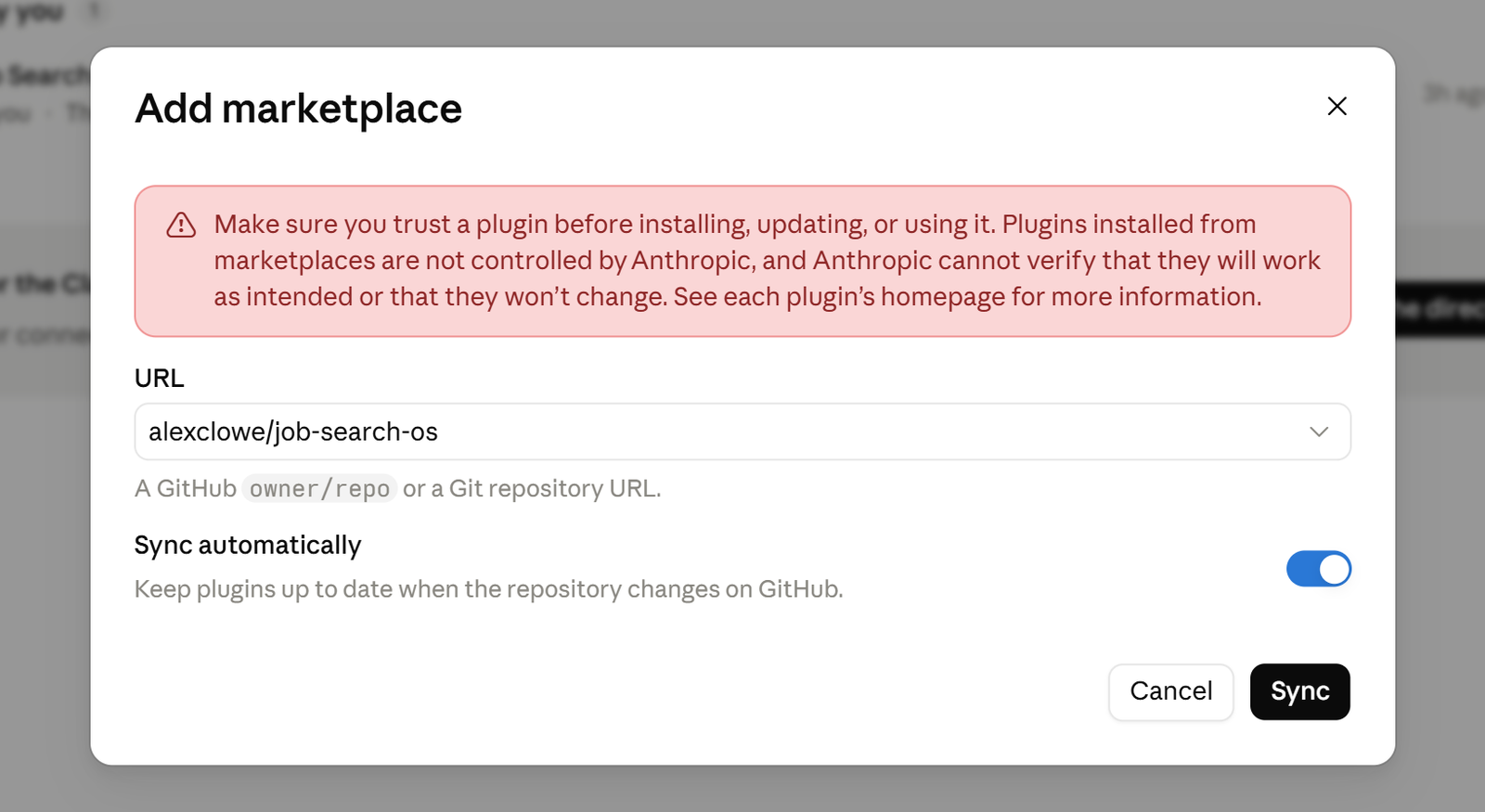
In the Claude desktop or web app: Customize → Plugins → Add → Add marketplace → Add from a repository → type alexclowe/job-search-os → Sync → Add. Prefer a file? Upload the zip from the free kit instead.

Install: from the marketplace or a zip1:12, narrated
The repository field filled with alexclowe/job-search-os and the Sync button.
Add from a repository, type alexclowe/job-search-os and click Sync. Leave Sync automatically on to get new releases.

Using Claude Code instead? /plugin marketplace add alexclowe/job-search-os then /plugin install job-search-os@job-search-os.

Your first ten minutes

  1. Start a new Project in Claude and say “set up my Job Search OS.” Attach your resume, or say “build my resume” if you don’t have one.
  2. Answer the one card it shows you: mainly your minimum pay, in the way you’re paid (hourly, salary, commission or a salary schedule).
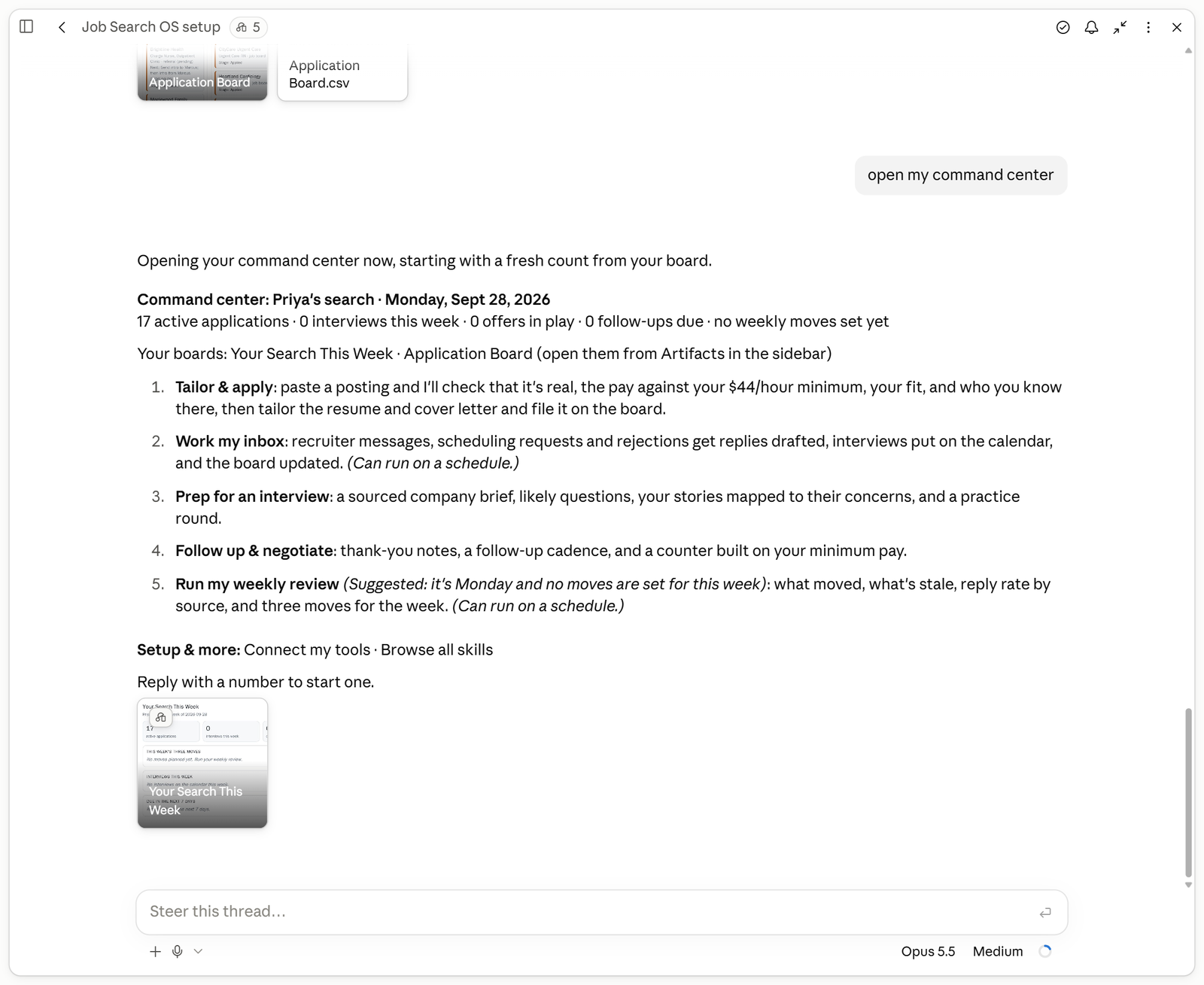
  3. Land on your command center. Say “open my command center” any time to come back.
  4. Not ready to use your own details? Pick Try it on a sample and watch it run a made-up nurse’s or data engineer’s search first.
Setup: resume to command center1:44, narrated
The command center: a summary line, the five jobs and the Your Search This Week card.
Your command center: five jobs and where your search stands. Say “open my command center” any time.

The five jobs

Pick one from your command center, or just say it. Each runs start to finish and files its results on your boards.

Tailor & apply

Say this: “Here’s a posting. Tailor and apply.”

  • One check card first: is the posting real, does the pay clear your minimum, how well you fit, and who you know there. Then you choose: tailor it, skip it, or get the intro first.
  • A tailored resume and cover letter that lead with your real results, plus answers for the application form.
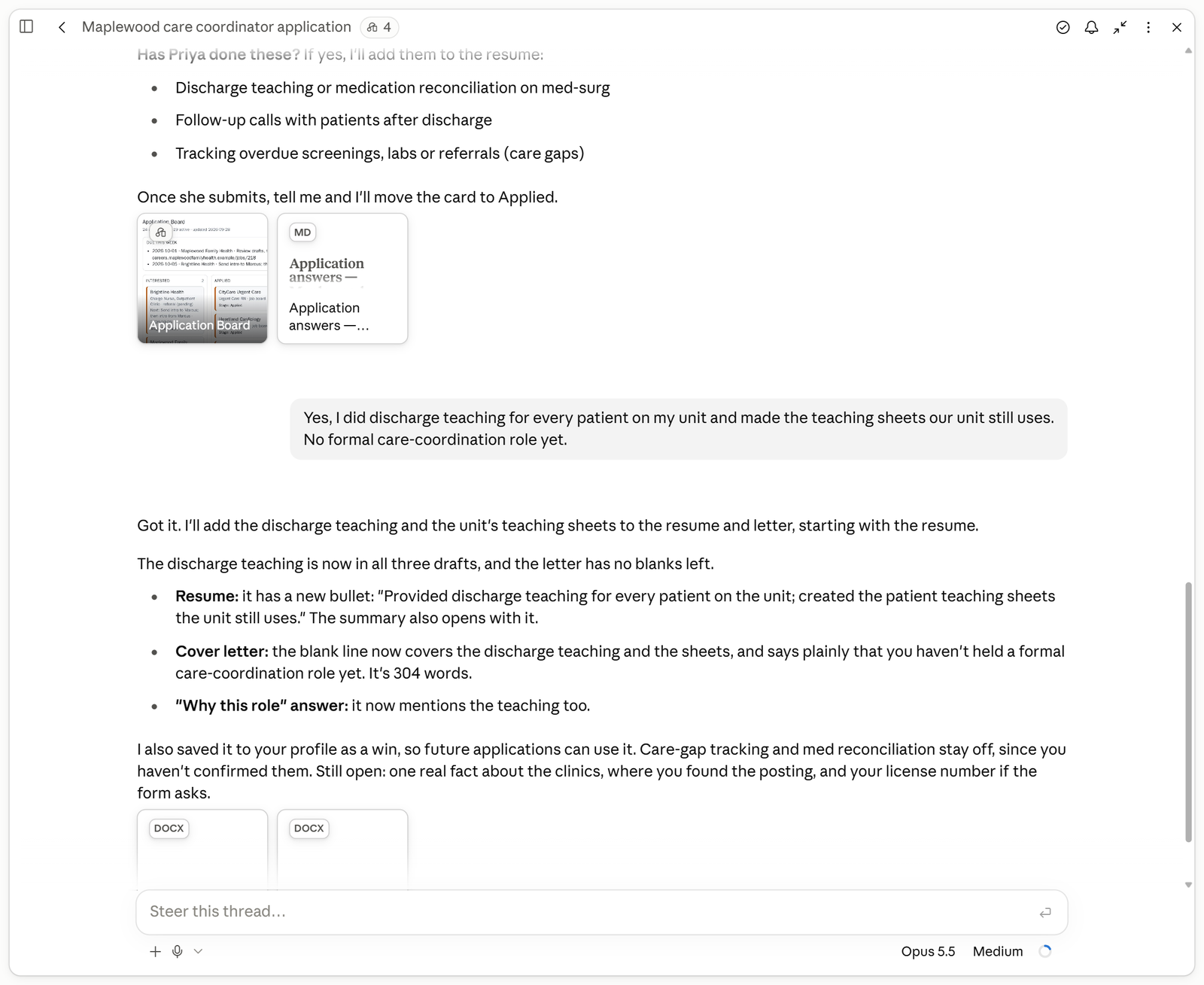
  • “Did you do this?” questions for anything the posting asks for that your record doesn’t show yet. Nothing is added until you say yes.
  • A new card on your Application Board with the follow-up date.
The check card: real, pay, fit, who you know0:56, narrated
Questions asking whether she has done things the posting mentions, her answer, and the updated resume and cover letter.
It asks before it adds anything your record doesn’t show.

Work my inbox

Say this: “Work my inbox.”

  • Recruiter replies drafted in your voice, with your minimum pay protected.
  • Interviews put on your calendar, and rejections read once and closed.
  • Each application moved to its new stage on your Application Board.
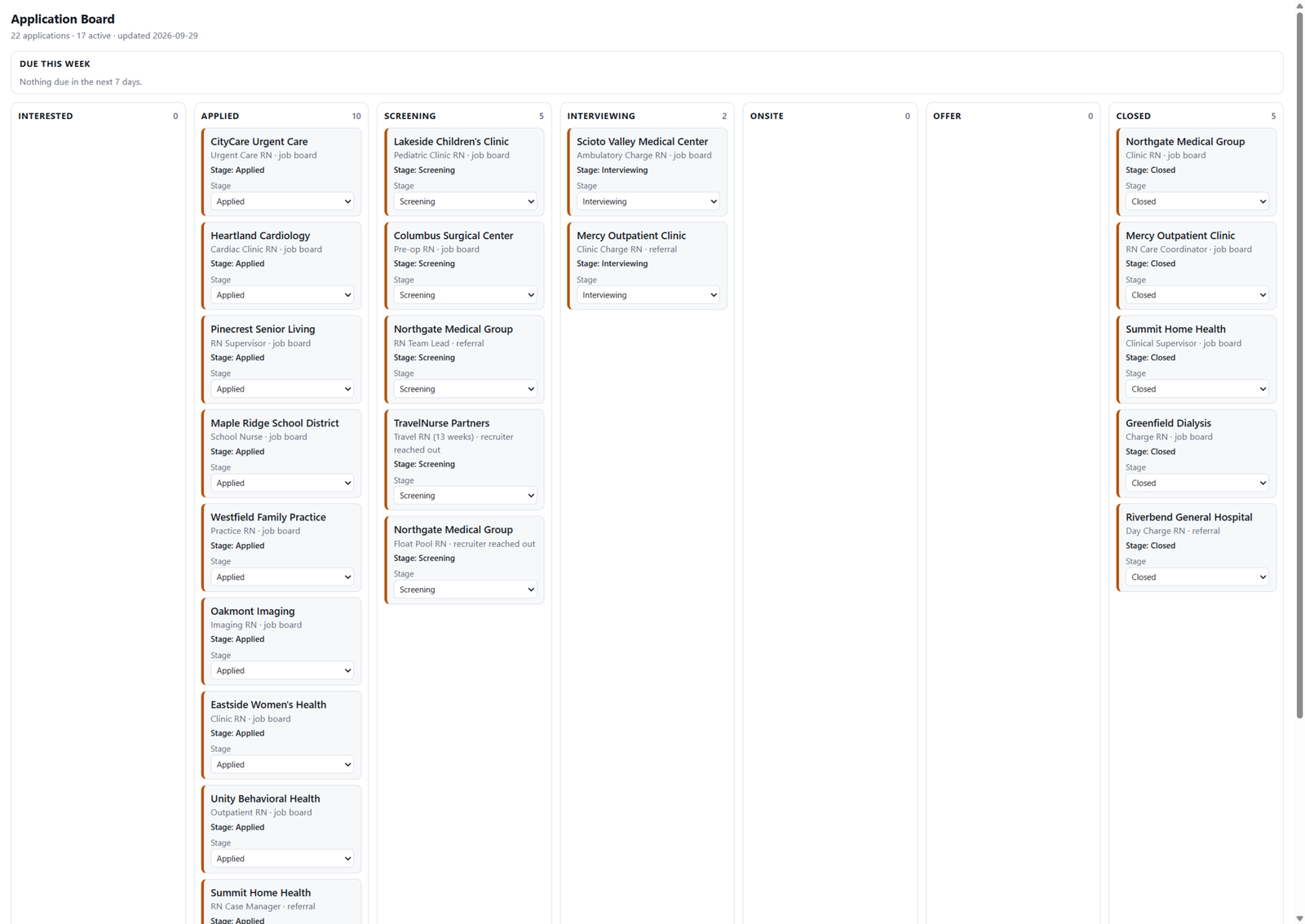
The Application Board with a column per stage, every card showing its stage in words and a Stage menu.
Move a card yourself and the next job you run picks it up. Or just tell Claude “move Lakeside to Screening.”

Prep for an interview

Say this: “Prep me for my recruiter screen with Brightline on Tuesday.”

  • A company brief first, with a source and a date on every fact. If it can’t find something, it leaves it blank instead of guessing.
  • The questions that round usually asks, answers built from your own stories, and questions to ask back.
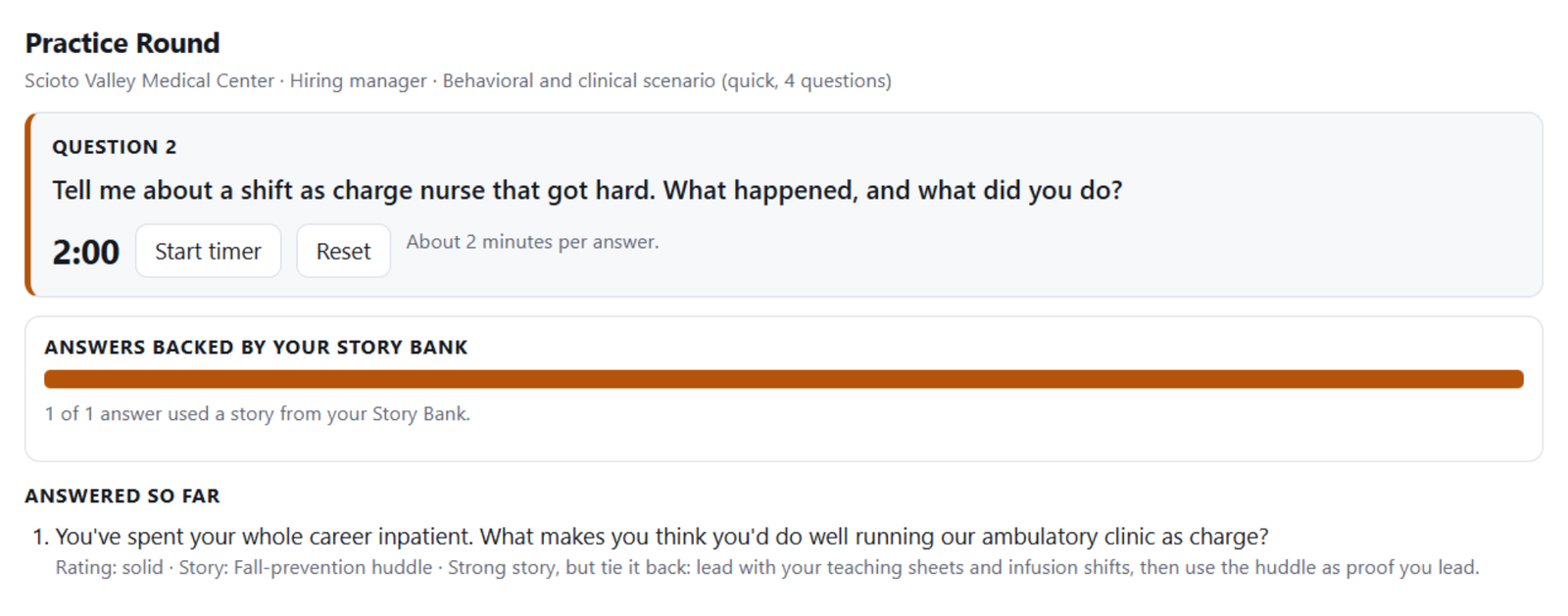
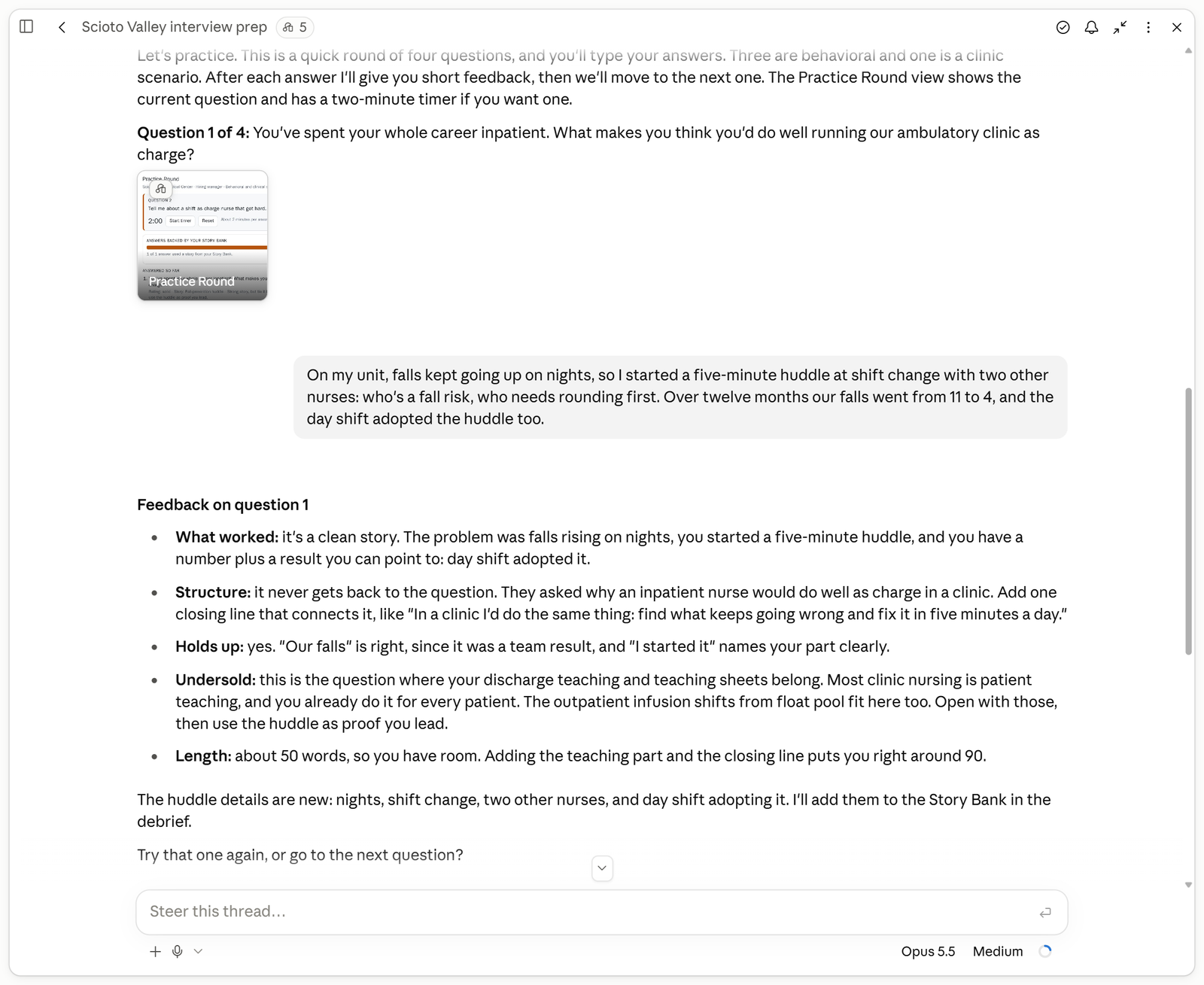
  • A practice round: one question at a time, in the format your line of work uses, with short feedback on each answer.
Mock interview with the Practice Round view0:58, narrated
The Practice Round view: the current question with an answer timer and the last answer’s rating and feedback.
Practice out loud, one question at a time.

Follow up & negotiate

Say this: “I got an offer. Help me counter.”

  • Thank-you notes and follow-ups on a sensible schedule.
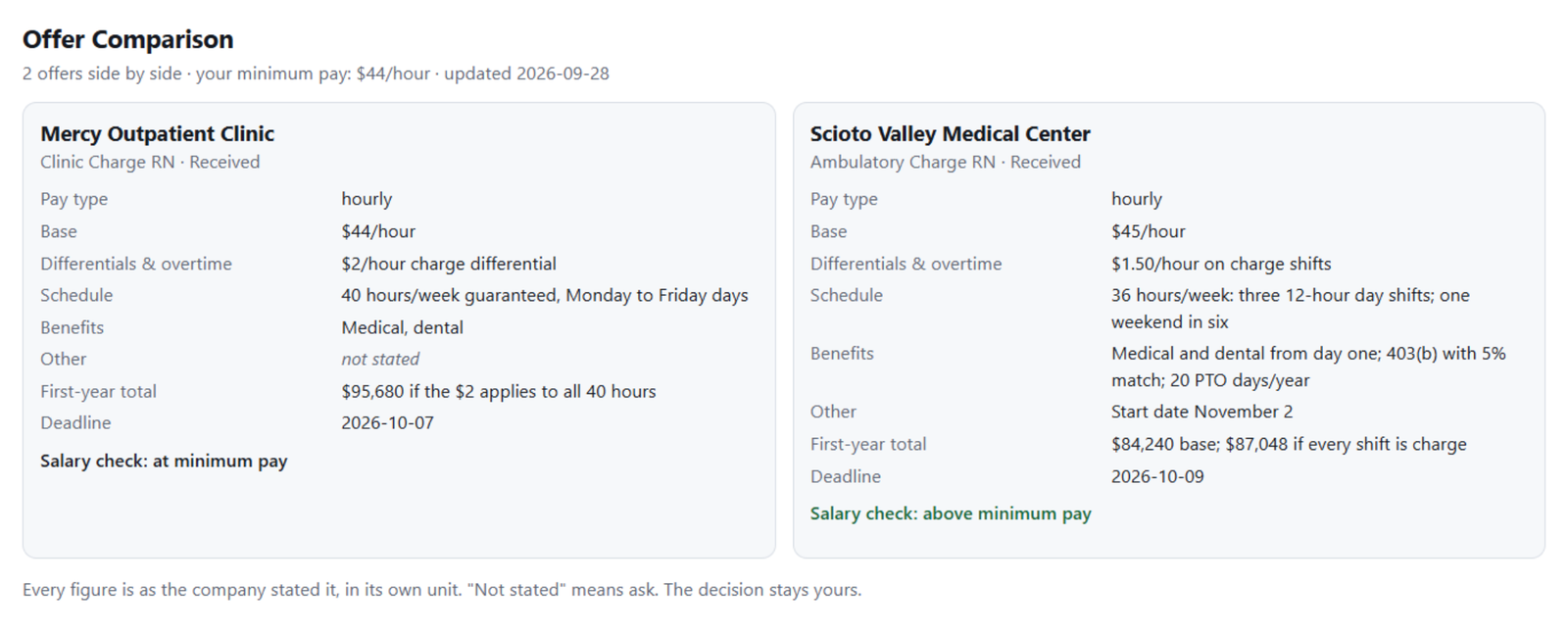
  • Offers compared side by side, in your pay type: base, shift differentials or commission, schedule, benefits. “Not stated” wherever the company didn’t say.
  • A counter with the exact words to use. It never accepts or declines for you.
Offer comparison, side by side0:51, narrated
Two hourly offers side by side: base, differentials and overtime, schedule, benefits, and a salary check on each.
Two offers, side by side, hour for hour.

Run my weekly review

Say this: “Run my weekly review.”

  • What moved this week and what’s gone quiet.
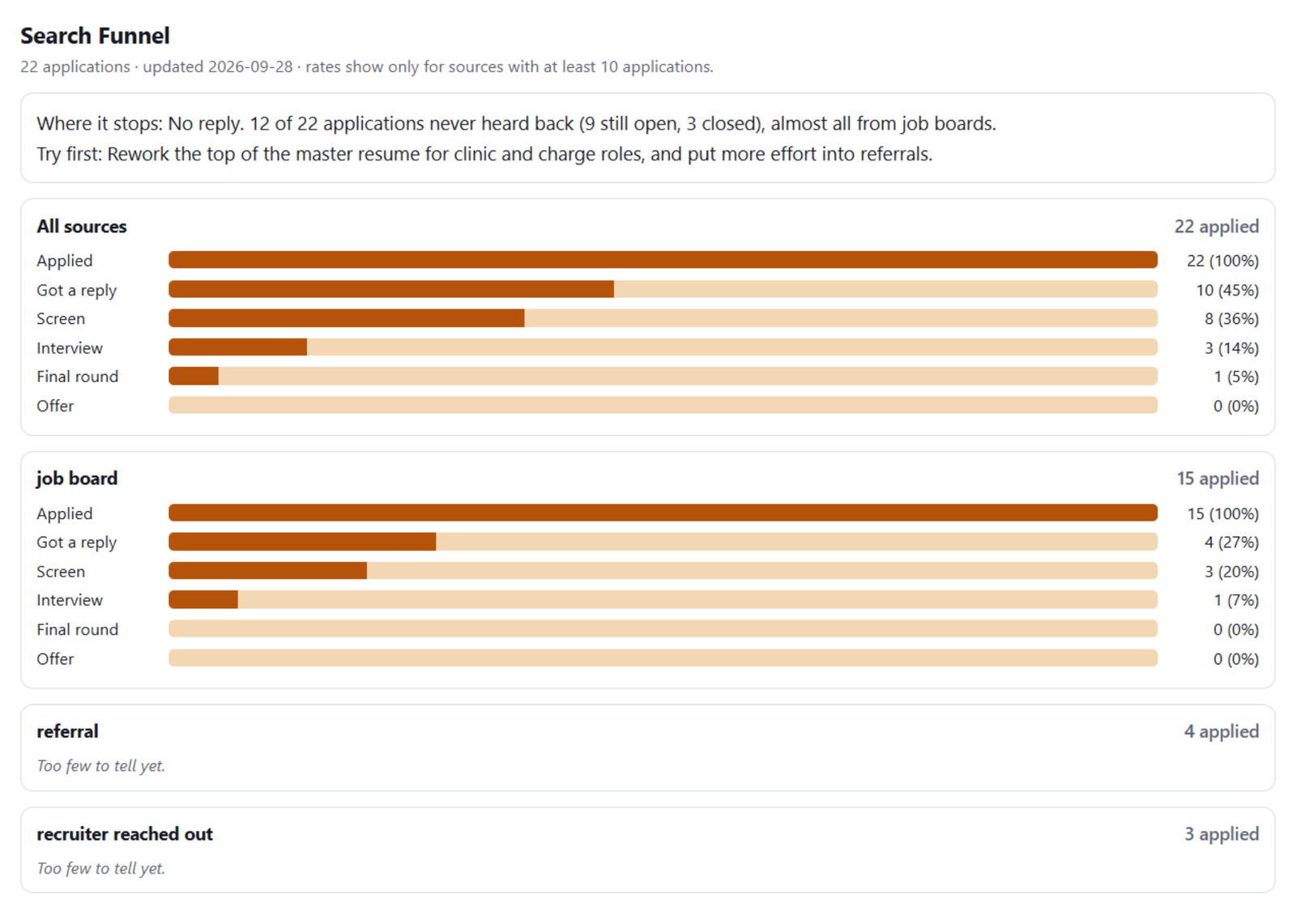
  • Where your search stalls, by source, with “too few to tell yet” when the numbers are small.
  • Exactly three things to do this week, the messages they need, and time blocked on your calendar.
  • It starts by picking up any card you moved on your Application Board since last time.
Move a card, then run your weekly review1:03, narrated
The Search Funnel: applied, got a reply, screen, interview, final round and offer as bars, by source.
Where your search stalls, by source.

Your boards

They live in your Claude Project and carry across conversations, so you never re-explain your search. Open them any time from Artifacts in the sidebar.

Application Board

Every application in a column for its stage. Move a card yourself, or tell Claude, and every job stays in step.

Your Search This Week

One screen with active applications, interviews, offers in play, follow-ups due and this week’s three moves.

Story Bank

Your real results turned into interview stories, reused by prep, practice and cover letters.

Offer Tracker and comparison

Every offer, its deadline, and a side-by-side view in your pay type.

People

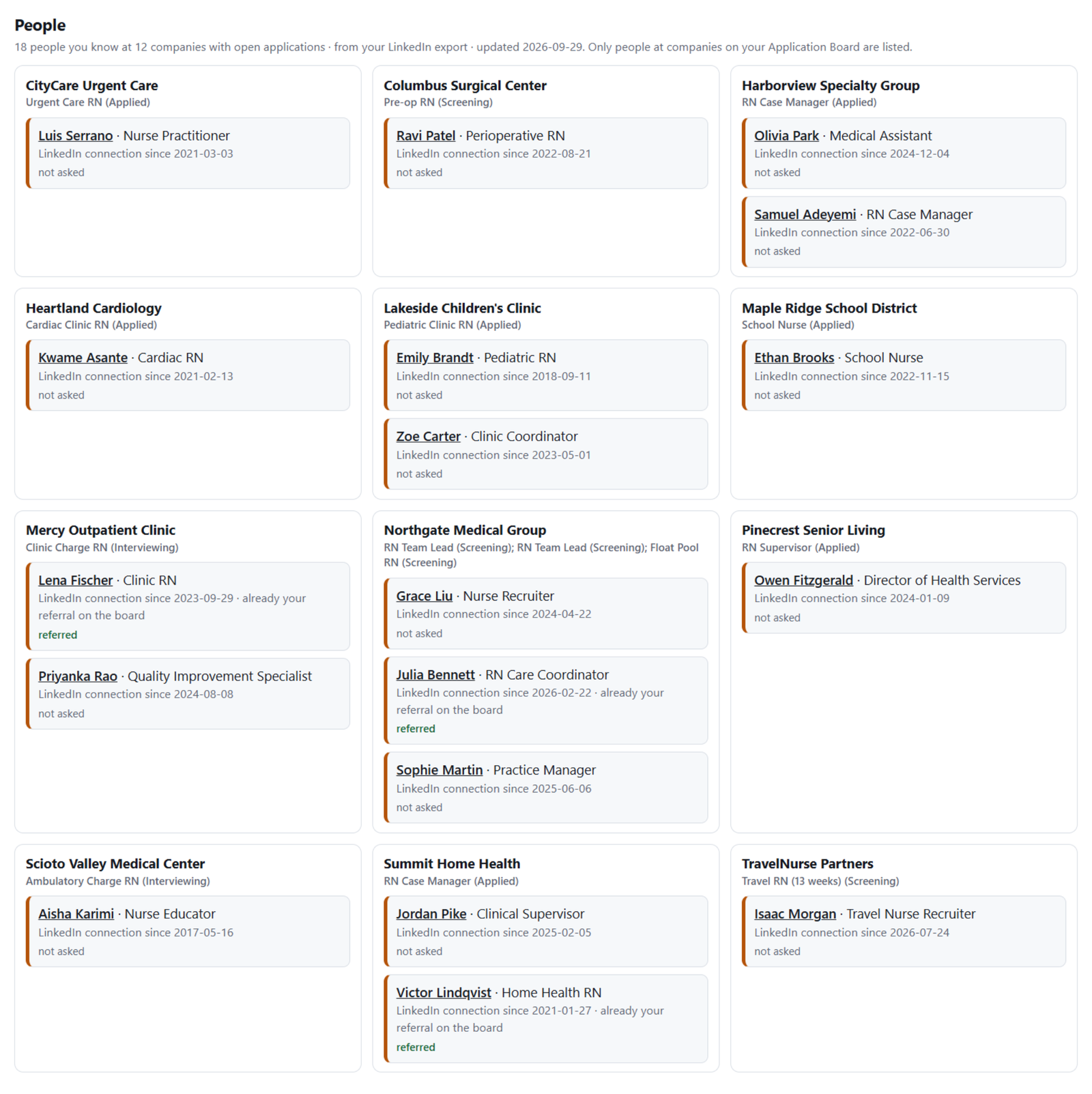
People you already know at the companies you’re applying to, from your LinkedIn export. It never messages anyone.

Search Funnel

Reply rate by source and where applications stall.

Who you know: LinkedIn import0:43, narrated
The People board: people she knows at companies on her Application Board, grouped by company.
Who you know at the companies you’re applying to. It never messages anyone.

Guardrails, always on

Your minimum pay comes first

Every posting and offer is checked against the lowest pay you’ll take, compared like with like: hourly to hourly, salary to salary, commission by base and realistic total.

Every claim holds up

Nothing goes on a resume that you couldn’t explain in an interview.

Nothing invented

Any number or result your record doesn’t show becomes a question for you, never a line on your resume.

Nothing sends without your click

Emails, calendar holds and files are drafts you approve. It never accepts, declines or resigns for you.

Scam and ghost-posting warning signs

Postings and recruiter messages are checked against the warning signs the FTC and FBI publish. It flags signs; you decide.

Works for your profession

Built-in guides for 108 professions and trades, from nurses, teachers, electricians and truck drivers to software developers and loan officers. Tell it your line of work and it uses the titles hiring teams post, how interviews usually run, how pay is usually structured and what’s usually negotiable, in the US and Canada.

See all 108 professions →
A mock interview set up the way nurses are interviewed, with a clinic scenario, and five-line feedback on the first answer.
A nurse gets a clinic scenario; feedback comes in five short lines.

Every clip, start to finish

Twelve short narrated recordings, including the full tailored application, interview prep and negotiation.

First run: install, setup, one sample application2:33Add the plugin, paste a resume, land on the command center, and watch the nurse sample run from the check card to the Application Board.
Install: from the marketplace or a zip1:12
Setup: resume to command center1:44
The check card: real, pay, fit, who you know0:56
Move a card, then run your weekly review1:03
Tailor & apply1:33
Who you know: LinkedIn import0:43
Prep for an interview1:02
Mock interview with the Practice Round view0:58
Offer comparison, side by side0:51
Follow up & negotiate1:27
Funnel report: where the search stalls0:41

All clips are narrated recordings of the plugin running on a fictional sample search. Nothing is sent, submitted, or accepted without your approval.

Questions

Is it really free?

Yes. The plugin is free and open source on GitHub. The download on Gumroad is pay what you want, with a $0 minimum; it adds PDF guides and asks for an email so we can send updates.

What do I need to use it?

The Claude app (desktop or web) on a paid Claude plan: Pro, Max, Team or Enterprise. Claude plugins aren’t available on the free Claude plan.

Does it work in ChatGPT or on the free Claude plan?

The plugin itself runs only in the Claude app. The free download also includes every prompt as a PDF and a click-to-copy page, which you can paste into any AI, including ChatGPT, one at a time. You won’t get the command center, the boards or the saved profile that way.

Does it send emails or apply to jobs for me?

No. If you connect Gmail, Google Calendar or Google Drive, it drafts into them and waits for you to approve each one. It never submits an application, accepts an offer or messages anyone on its own.

Where does my information go?

Your profile, resume and boards stay in your own Claude Project and your own connected accounts. The plugin is only instructions for Claude; it has no server of its own and collects nothing.

Can I share my Application Board?

You can, with limits. Boards that save your moves stay private to your Claude account or organization, with no public link, and anyone you share one with as a viewer can see it but can’t move cards.

Does it work for my profession?

Yes. It has built-in guides for 108 professions and trades, from nurses, teachers and electricians to software developers and loan officers. Each covers the titles to search, how interviews usually run, how pay is usually structured and what’s usually negotiable.
Try it on your next posting

Free, open source, and running in the Claude app you already use. Every clip on this page is a real recording on a made-up job seeker.

Comparing options? How it compares with career-ops and ai-job-search.